How to Choose an AI Model
Talizen's AI chat supports several models. They differ a lot in design ability, reasoning ability, and how many credits they cost, so picking the right one saves both credits and rework.
This page explains every piece of information on the model selector, and which model to pick for which kind of job.
Where to switch models
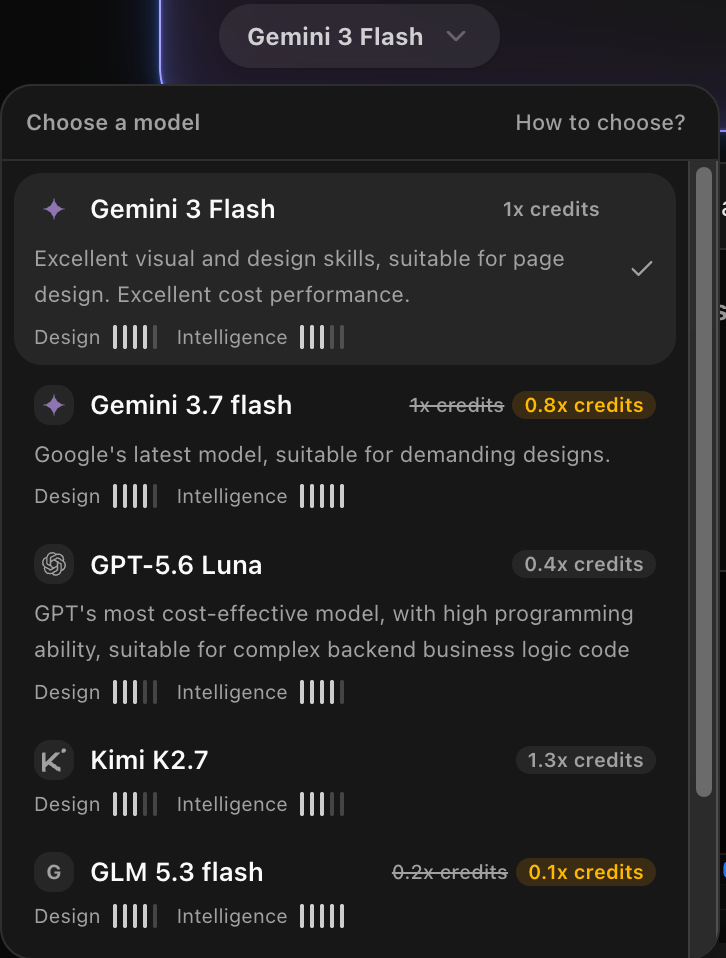
The name of the model you are using sits in the bottom left of the AI chat input. Click it to expand the list. Each model is a card, and selecting one switches to it. The switch applies from your next message onward, and nothing in the current conversation is lost.
How to read a model card
| What you see | What it means |
|---|---|
| Provider icon and model name | Which vendor the model comes from, and what it is called inside Talizen. |
| N× credits | How much it costs relative to the baseline model. 1× is the baseline, 0.1× means the same call costs a tenth of the baseline, and 1.3× means it costs 1.3 times as much. |
| A struck-through rate | The model is discounted right now. If the card strikes out 0.2× and shows 0.1× next to it, you are charged 0.1×. |
| One-line summary | What this model is best at. Most of the time this line is all you need. |
| Design | Visual quality: layout, typography, color, and overall look of the page. |
| Intelligence | Reasoning: breaking down complex requests and making changes that span several pages or sections. |
Design and Intelligence are both five-segment bars. More filled segments means stronger.
The models you can pick from
The table below lists the models in the selector at the time of writing. Models get added or retired and rates get adjusted, so the selector is always the source of truth.
| Model | Credits | Design | Intelligence | Best at |
|---|---|---|---|---|
| Gemini 3 Flash | 1× | 4/5 | 3/5 | Strong visual and design skills, good for page design, good value. This is the default. |
| Gemini 3.7 flash | 0.8× (was 1×) | 4/5 | 5/5 | Google's latest model, for pages with more demanding design requirements. |
| GPT-5.6 Luna | 0.4× | 3/5 | 4/5 | Strong programming ability, suited to complex backend business logic. |
| Kimi K2.7 | 1.3× | 3/5 | 3/5 | The most expensive tier in the list. |
| GLM 5.3 flash | 0.1× (was 0.2×) | 4/5 | 5/5 | High on both scores and cheap to run. |
| Deepseek V4 Flash | 0.1× | 3/5 | 4/5 | Excellent value, suited to text-heavy work such as copywriting and translation. |
Pick in one line
| What you are doing | Model to use |
|---|---|
| Generating the first version of a page, where looks matter most | Gemini 3 Flash |
| Pages with demanding design or a complex structure | Gemini 3.7 flash |
| Small edits: copy, images, spacing | Deepseek V4 Flash or GLM 5.3 flash |
| Login, forms, payments and anything else that needs backend logic | GPT-5.6 Luna |
| Rewriting long copy, and translation | Deepseek V4 Flash |
A few rules of thumb
Cheap first, expensive second. Try a low-rate model once, and only move up if the result is not good enough. That beats reaching for the expensive model every time.
The smaller the change, the cheaper the model can be. A well-scoped small edit is usually something a cheap model gets right.
The first draft deserves a strong design model. The structure and look of the first version shape every later edit, so this is where good output saves the most rework.
If it keeps getting it wrong, switch models instead of retrying. When the same model misses several times in a row, switching usually costs fewer credits than three more attempts.
The rate is not the whole story. Real spend also depends on conversation length and task complexity. See AI Credits Guide for more ways to spend less.